

Creating a BeatPass account is free and only takes a minute. Once you’re signed up, you can start exploring beats, creating playlists, and engaging with the community.Documentation Index
Fetch the complete documentation index at: https://docs.beatpass.ca/llms.txt
Use this file to discover all available pages before exploring further.
How to Sign Up
Go to the registration page
Click Sign up in the top navigation bar, or visit the registration page directly.
Enter your details
Fill in the registration form: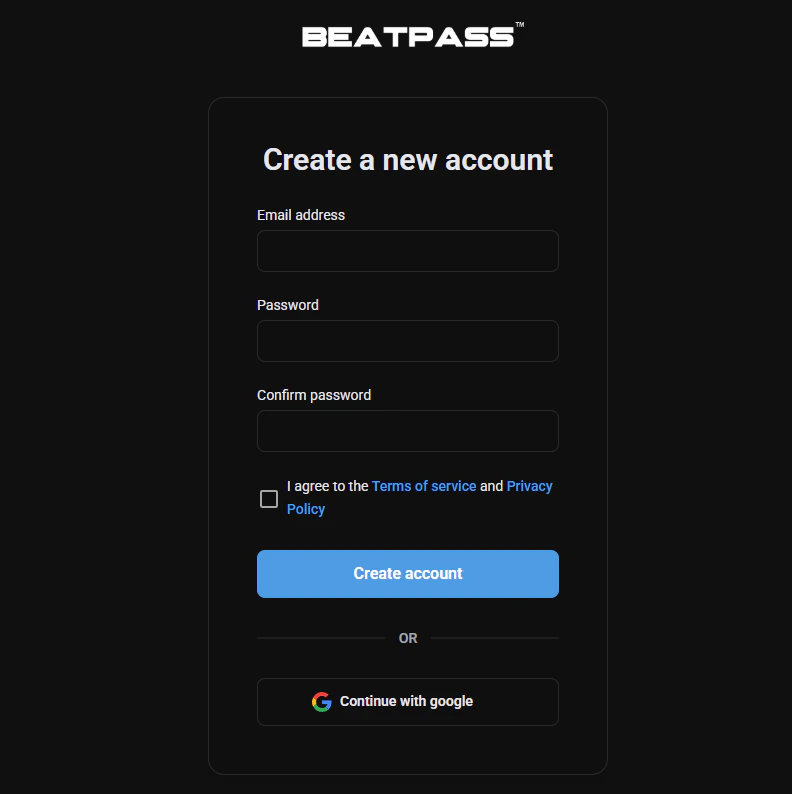
- Email address — Use an email you have access to (you’ll need to verify it)
- Password — Create a secure password
- Confirm password — Re-enter your password to confirm
Accept the terms
Check the box to confirm you agree to the Terms of Service and Privacy Policy. You can click the links to read them before agreeing.
Email Verification
After signing up, you’ll need to verify your email address before you can fully use your account.What to Expect
- A verification email will be sent to the address you provided
- The link in the email expires after 24 hours
- Until you verify, you’ll see a reminder when you visit BeatPass
Didn’t Receive the Email?
If you don’t see the verification email:- Check your spam or junk folder
- Make sure you entered your email address correctly
- Click Resend email on the verification reminder page to request a new link
What You Can Do With a Free Account
Once your account is verified, you can:- Stream — Listen to the entire beat catalog
- Save favorites — Like beats to find them later
- Create playlists — Organize beats into custom playlists
- Follow producers — Stay updated when your favorite producers upload new beats
- Comment — Leave feedback on beats you enjoy
- Browse history — See what you’ve listened to recently
To download beats with commercial licenses, you’ll need to upgrade to a paid subscription. See our pricing page for plan options.
Already Have an Account?
If you already have an account, click Sign in instead of Sign up, or visit the login page.Having trouble logging in?
Find solutions for common login issues.